Onboarding an RFID Device
Onboarding an RFID Device
Overview
This article covers onboarding a handheld RFID device, including selecting a location, entering the detector number, and submitting the information in the Xemelgo app.
Instructions
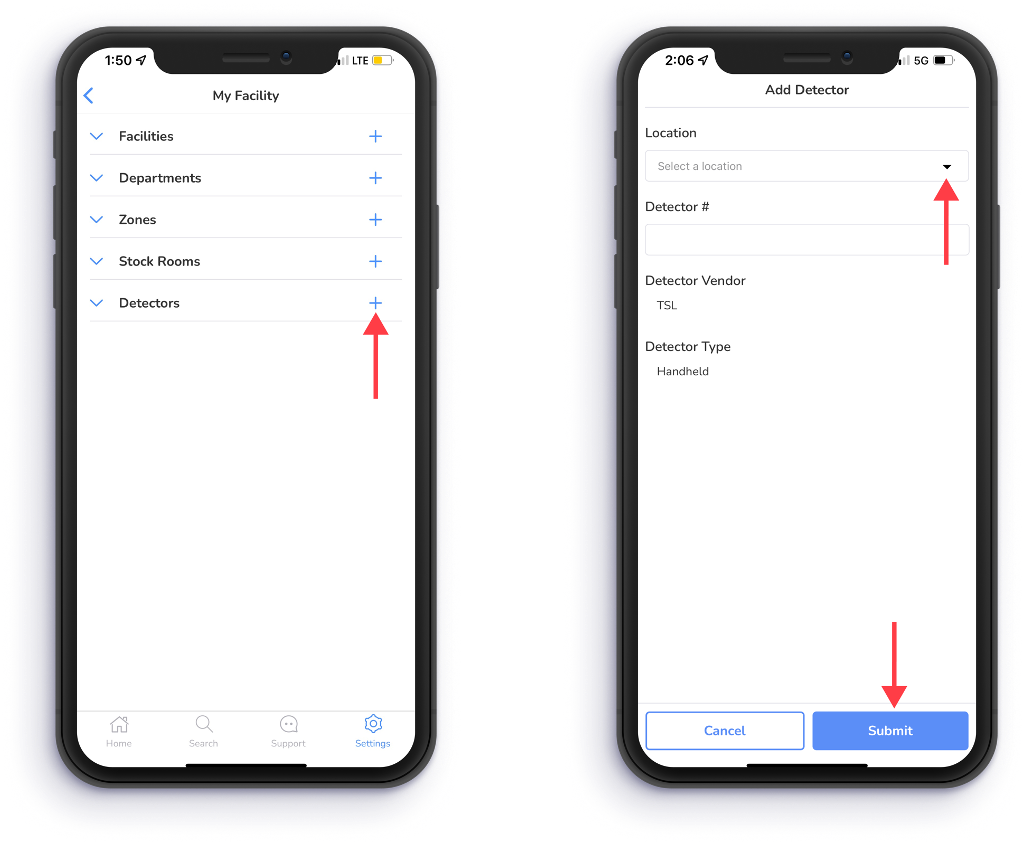
To begin onboarding a handheld RFID device, tap the "+" to the right of Detectors.
Next, select a Location from the dropdown.
Then enter the Detector #.
Once the Detector # has been entered the Detector Type should reflect the type of RFID device (mounted or handheld) that you are trying to onboard.
After entering both the Location and Detector #, tap Submit.
Need further assistance?
The article above couldn't resolve your issue? Use the chat button in the bottom-right corner to contact the support team.
Was this article helpful?